Skip this page if you only need manual transaction approval via the MPCVault app. The client signer is only required for automated signing.
The client signer is a Docker container that:
- Maintains a secure connection to MPCVault
- Receives signing callbacks when you call
ExecuteSigningRequests
- Approves transactions based on your callback server’s response
Prerequisites
- Docker (or Docker Compose) installed
- A server with a stable internet connection
- A callback endpoint on your backend to receive and approve signing requests
- An API user already created
Step 1: Generate an Ed25519 Key Pair
The client signer authenticates with MPCVault using an Ed25519 key pair. Generate one locally:
# Generate the key pair
ssh-keygen -t ed25519 -C "mpcvault-client-signer" -f ./client-signer-key -N ""
# View the public key (you'll need this for MPCVault console)
cat ./client-signer-key.pub
# View the private key (you'll need this for config.yml)
cat ./client-signer-key
The public key looks like:
ssh-ed25519 AAAAC3NzaC1lZDI1NTE5AAAAIK0wmN/Cr3JXqmLW7u+g9pTh+wyqDHpSQEIQczXkVx9q mpcvault-client-signer
No password: The key must not have a passphrase for the client signer to use it automatically.
Step 2: Register the Client Signer in Your Vault
- Go to console.mpcvault.com
- Navigate to your vault’s Team & policies page
- Click + New Client Signer
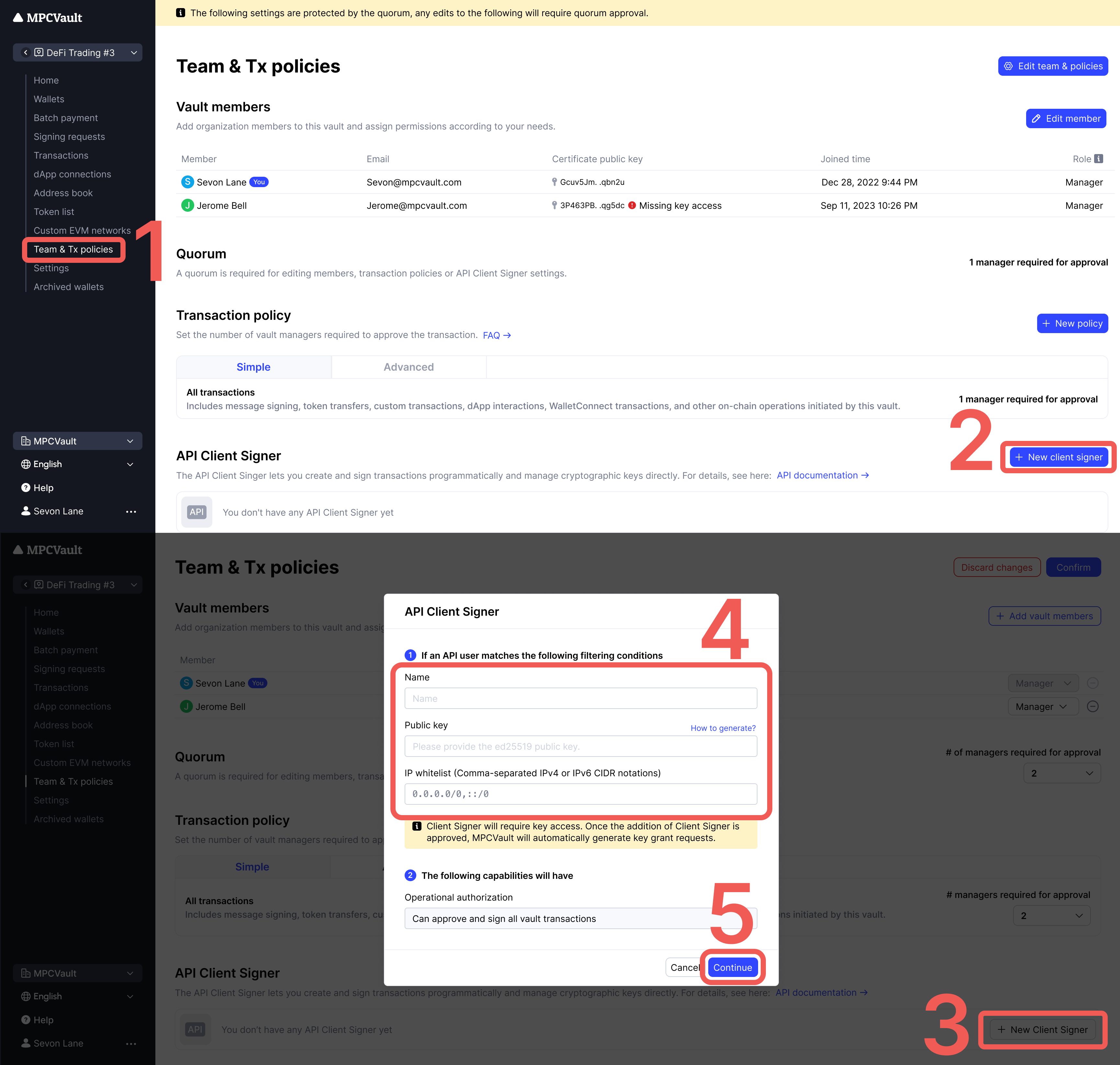
- Enter the information:
| Field | Description |
|---|
| Name | Identifier for this signer (e.g., production-signer) |
| Public key | Paste the contents of client-signer-key.pub |
| IP Whitelist | (Optional) Your server’s IP addresses |
- Click Continue → Confirm to create a signing request
- Approve the Vault setting update request in the MPCVault app
Step 3: Grant Key Access
After creating the client signer, MPCVault automatically creates a Key grant access signing request. This grants the client signer permission to participate in MPC signing.
Approve this request in the MPCVault app to complete setup.
One signer per vault: Each vault requires its own client signer. You cannot reuse the same signer across multiple vaults.
Step 4: Create the Configuration File
Create config.yml with your settings:
# Health check endpoint for monitoring
http-health:
listening-addr: 0.0.0.0:8080
# Your vault's UUID (find in vault settings)
vault-uuid: "350063e9-xxxx-xxxx-xxxx-aaf939821815"
# Authentication
ssh:
private-key: |
-----BEGIN OPENSSH PRIVATE KEY-----
b3BlbnNzaC1rZXktdjEAAAAABG5vbmUAAAAEbm9uZQAAAAAAAAABAAAAMwAAAAtz
c2gtZWQyNTUxOQAAACCtMJjfwq9yV6pi1u7voPaU4fsMqgx6UkBCEHM15FcfagAA
AJgPBwb8DwcG/AAAAAtzc2gtZWQyNTUxOQAAACCtMJjfwq9yV6pi1u7voPaU4fsM
qgx6UkBCEHM15FcfagAAAEBKbCX7sP2Y3yL4H8Mz220wK0wmN/Cr3JXqmLW7u+g9
pTh+wyqDHpSQEIQczXkVx9qAAAAFW1wY3ZhdWx0LWNsaWVudC1zaWduZXI=
-----END OPENSSH PRIVATE KEY-----
password: ""
# Your callback endpoint
callback-url: "http://host.docker.internal:8088/api/mpcvault/callback"
Configuration reference:
| Field | Description | Example |
|---|
http-health.listening-addr | Health check endpoint | 0.0.0.0:8080 |
vault-uuid | UUID from vault settings page | 350063e9-... |
ssh.private-key | Full private key content | -----BEGIN OPENSSH... |
ssh.password | Key passphrase (empty if none) | "" |
callback-url | Your backend endpoint for approvals | http://your-server:8088/callback |
Step 5: Run the Client Signer
Option A: Docker Run (Development)
docker run -d \
--name mpcvault-signer \
--restart unless-stopped \
-p 8080:8080 \
-v $(pwd)/config.yml:/config.yml:ro \
ghcr.io/mpcvault/client-signer:latest \
--config-path=/config.yml
Option B: Docker Compose (Recommended for Production)
Create docker-compose.yml:
version: '3.8'
services:
mpcvault-signer:
image: ghcr.io/mpcvault/client-signer:latest
container_name: mpcvault-signer
restart: unless-stopped
ports:
- "8080:8080"
volumes:
- ./config.yml:/config.yml:ro
command: ["--config-path=/config.yml"]
healthcheck:
test: ["CMD", "curl", "-f", "http://localhost:8080/health"]
interval: 30s
timeout: 10s
retries: 3
start_period: 10s
logging:
driver: "json-file"
options:
max-size: "10m"
max-file: "3"
Start with:
Verify it’s running
# Check container status
docker ps | grep mpcvault-signer
# Check health endpoint
curl http://localhost:8080/health
# View logs
docker logs -f mpcvault-signer
Step 6: Implement Your Callback Handler
When you call ExecuteSigningRequests, MPCVault sends a callback to your callback-url. Your server must:
- Receive the callback (POST request with protobuf body)
- Validate the signing request against your business rules
- Return HTTP 200 to approve, or 4xx/5xx to reject
Example callback handler (Node.js/Express):
const express = require('express');
const app = express();
// Parse raw protobuf body
app.use('/api/mpcvault/callback', express.raw({ type: '*/*' }));
app.post('/api/mpcvault/callback', async (req, res) => {
try {
// The body contains a serialized SigningRequest protobuf
const signingRequestData = req.body;
// Implement your validation logic here:
// - Check amount limits
// - Verify destination addresses
// - Apply rate limiting
// - Log for audit trail
const shouldApprove = await validateSigningRequest(signingRequestData);
if (shouldApprove) {
// Return 200 to approve the transaction
res.status(200).send('approved');
} else {
// Return 4xx to reject
res.status(403).send('rejected');
}
} catch (error) {
console.error('Callback error:', error);
res.status(500).send('error');
}
});
app.listen(8088, () => {
console.log('Callback server running on port 8088');
});
Security: Your callback endpoint should validate requests and implement appropriate access controls. Consider using request signing or IP whitelisting.
Docker Networking
| Your Setup | Callback URL Format |
|---|
| Callback server on same host as Docker | http://host.docker.internal:PORT/path |
| Callback server in same Docker network | http://service-name:PORT/path |
| Callback server on remote host | http://your-server.com:PORT/path |
host.docker.internal is a special DNS name that resolves to the host machine from inside a Docker container. It works on Docker Desktop (Mac/Windows) and recent Docker Engine versions on Linux.
How Signing Works
When you call ExecuteSigningRequests:
Troubleshooting
| Issue | Cause | Solution |
|---|
| Container won’t start | Invalid config.yml | Check YAML syntax and key format |
| No callbacks received | Wrong callback URL | Use host.docker.internal for local |
| Connection refused | Port not exposed | Verify -p 8080:8080 mapping |
| Auth failed | Key mismatch | Ensure public key matches private key |
| Key access denied | Missing approval | Approve Key grant access in app |
| Timeout | Callback too slow | Respond within 30 seconds |
| Transaction rejected | Non-200 response | Check your validation logic |
Useful Commands
# Check signer logs
docker logs -f mpcvault-signer
# Restart signer
docker restart mpcvault-signer
# Check health
curl http://localhost:8080/health
# Test callback endpoint
curl -X POST http://localhost:8088/api/mpcvault/callback \
-H "Content-Type: application/octet-stream" \
-d "test"