How to off-ramp crypto?
MPCVault Off-ramp allows you to convert stablecoins (USDT/USDC) into fiat currency (USD, EUR, etc.) and send the funds to any verified bank account.
It bridges your digital assets with the traditional financial system, enabling real-world usage such as:
- Withdrawing funds to your business bank account
- Making payments to vendors or suppliers
- Settling invoices
Get started in 3 steps:
-
Complete KYB – Verify your business if you haven’t already.
-
Add a verified recipient – Ensure the recipient’s bank account is verified.
-
Create a fiat payment – Initiate the off-ramp process and transfer crypto to fiat.
🏢 Step 1: How to complete KYB?
KYB is required to enable fiat payments. Currently, only business accounts are supported.
-
Navigate to the Fiat Payment Menu: The org admin navigates to the Fiat payment page and clicks “Get started” to access the KYB page.
-
Submit Required Documents: Upload all necessary documents and details as prompted.
-
Await Approval: The verification process may take some time. The fiat payment feature will be unlocked once the review is complete.
👤 Step 2: How to add a verified recipient?
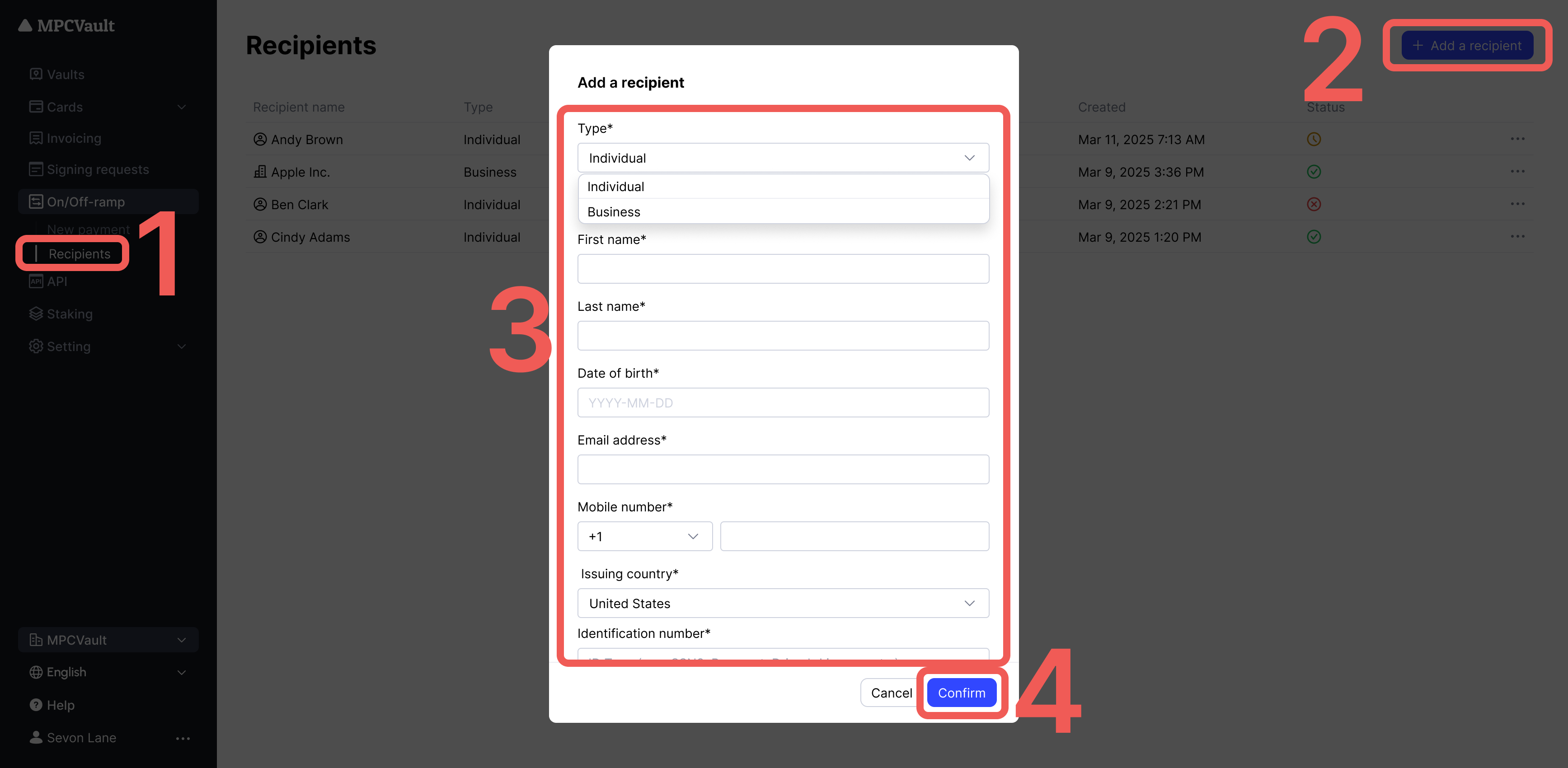
You can add individuals or businesses as recipients.
Verification is required before off-ramp can proceed, as per AML regulations.
-
Go to the Recipients Page: Select the “Recipients” menu and click the ”+ Add a recipients” button in the top right corner.
-
Submit Required Documents: Upload all necessary documents and details as prompted.
-
Await Approval: Once approved, the recipient status will change to Verified, allowing you to use this recipient for fiat payment transactions.
💸 Step 3: How to create a fiat payment?
After completing KYB and recipient verification, follow these steps:
-
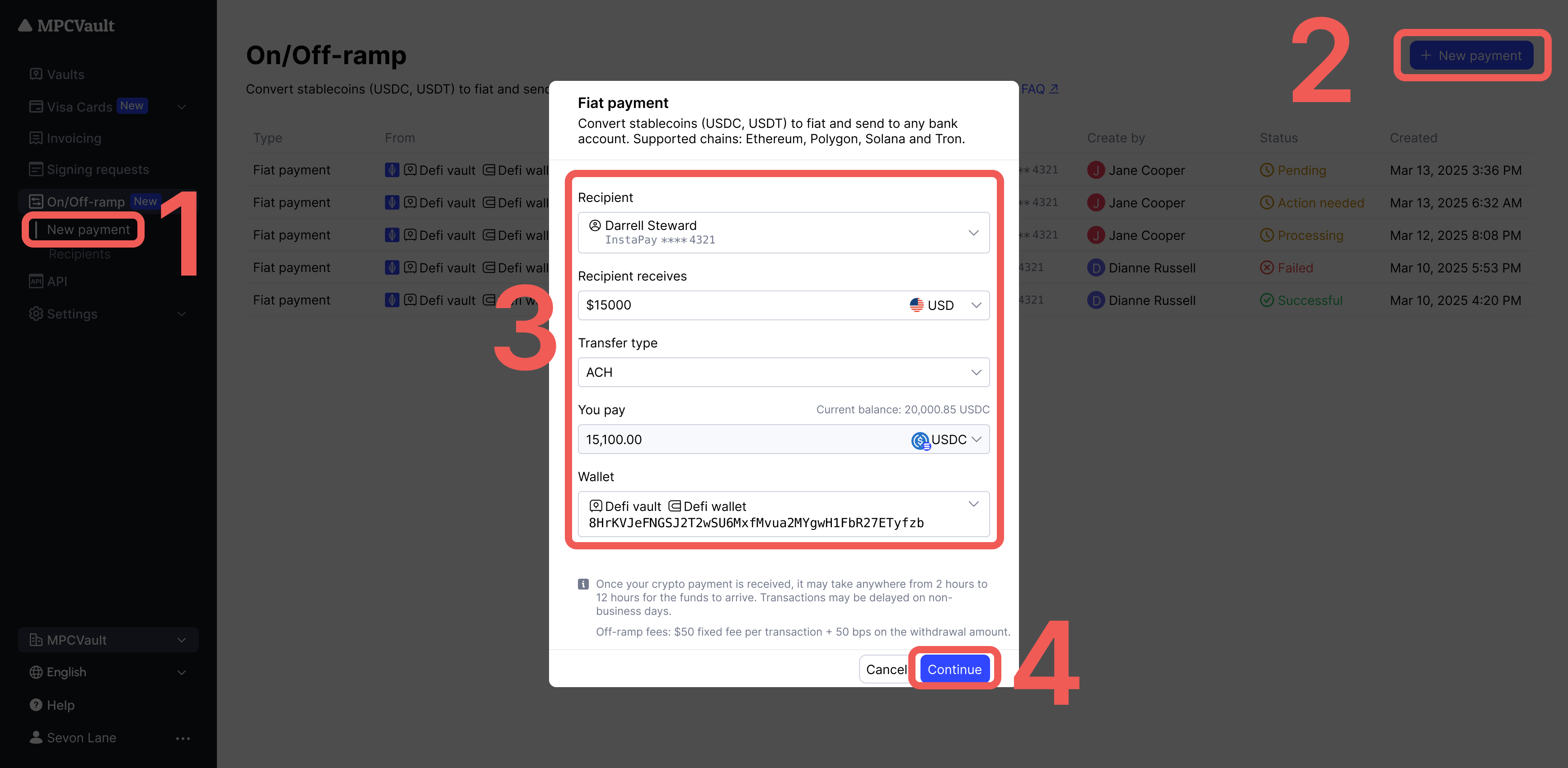
Go to the New Payment Page: Select the “New payment” menu and click the ”+ New fiat payment” button in the top right corner.
-
Fill Info: Enter wallet, recipient, source currency, and target currency details.
-
Confirm and Create Request: After verifying the information, click “Continue” to create a “Fiat payment” signing request.
-
Sign the Request: Open the MPCVault app to approve and sign the request.
How to deal with different order statuses?
| Status | Description | You should |
|---|---|---|
| Reviewing order | Your order is under review. | Wait for the review to complete. |
| Action needed: sign request in App | Fiat payment request created, awaiting your signature. | Open the App and sign within 30 minutes. |
| Pending on chain | Signing request signed. Transaction is broadcasting. | No action needed. |
| Processing payout | Transfer to recipient’s bank account in progress. | No action needed. |
| Completed | Payment completed successfully. | Check your recipient’s bank account. |
| Failed | Payment failed. | Ensure sufficient crypto & gas, then try again. |
Supported currencies
- Crypto: USDC, USDT
- Fiat: USD, EUR, GBP, SGD, AUD, AED (coming soon)
Supported chains
Ethereum, Polygon, Solana, Tron
Off-ramp fees
Off-ramp fees include processing and compliance costs.
| Fiat currency | Paid plan | Free plan |
|---|---|---|
| USD ACH | $10 fixed fee + 25bps | $10 fixed fee + 40bps |
| USD RTP | $10 fixed fee + 25bps | $10 fixed fee + 40bps |
| USD SWIFT | $35 fixed fee + 25bps | $35 fixed fee + 40bps |
| USD WIRE | $25 fixed fee + 25bps | $25 fixed fee + 40bps |
| EUR | $10 fixed fee + 35bps | $10 fixed fee + 50bps |
| GBP | $10 fixed fee + 35bps | $10 fixed fee + 50bps |
| SGD | $10 fixed fee + 100bps | $10 fixed fee + 100bps |
| AUD | $10 fixed fee + 100bps | $10 fixed fee + 100bps |
| AED (coming soon) | $10 fixed fee + 100bps | $10 fixed fee + 100bps |
- Before creating a fiat payment, ensure:
- Your wallet holds enough stablecoins (USDC, USDT).
- You have sufficient native tokens (ETH, POL, etc.) to cover gas fees.
- Fiat payment requests expire in 30 minutes if not signed. Please sign within this timeframe.
- After your crypto is received, fiat payout typically arrives within 2–12 hours. Delays may occur on non-business days.